By Sean Pilola, MAT, LAT, CES
Ergonomics Specialist, Fit For Work
Prior to 2020, hybrid and remote work opportunities were uncommon. Office spaces were standardized, with minimal opportunities to customize for individual comfort and function. Now, with the home office becoming a long-term reality for many workers, ergonomic best practices and tools are essential for creating healthier and more productive workspaces.
Below, we’ll discuss practical home office considerations — including setup, furniture selection, organization, and healthy habits — to help distributed workers stay comfortable and productive.
Adjustability & Workspace Setup
Adjustability plays a big role in well-being. With many employees setting up home offices in shared or multi-purpose spaces, having a workspace that can adapt to their needs is key. Here are a few features to consider when selecting a desk for your workspace:
- Configuration: Does your space allow for an L-shaped desk, or is a straight desk best suited to your needs? Which desk setup best fits your work style?
- Height: Not only should your desk be an appropriate height when sitting, but some individuals appreciate the flexibility to stand at their desk for a portion of the day.
- Movement: Standing desks can accommodate the addition of a walking pad underneath. This can be a great way to increase movement, improving circulation and flexibility.
Ergonomic task chairs are the perfect complement to a customizable desk setup. With dynamic lumbar support, adjustable armrests, and breathable materials, there are many options to develop the right configuration. When possible, try chairs in person to assess whether the chair’s size and design are the right match. For distributed workers navigating home and office environments, our companion article, Ergonomics in a Distributed Workforce: Bridging the Gap Between Home and Office, offers a deeper look at ergonomics across hybrid and remote roles.
Ergo Tip: Level your monitor with your eyebrows. The top of your monitor should sit at eyebrow height to keep your head and neck in a neutral position, helping reduce strain throughout the day.
Core Ergonomic Setup Principles
Below are some basic – but very important – considerations for designing an ergonomically sound home office setup:
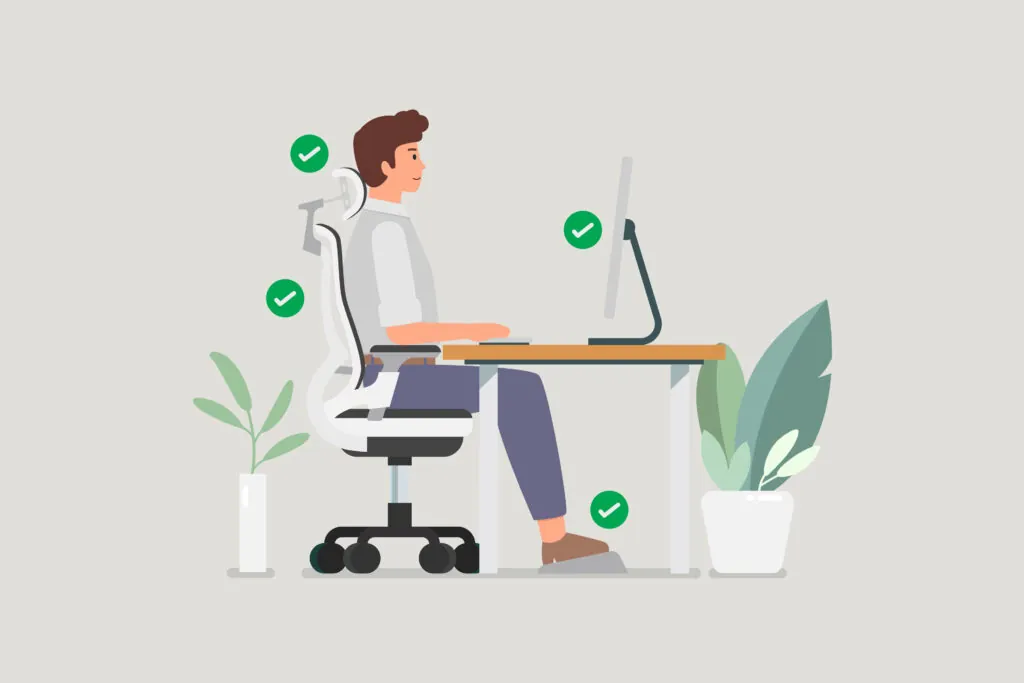
- Desk and Chair Alignment: Maintain 90° angles at elbows, hips, and knees. The chair should allow feet to comfortably rest flat on the ground, as dangling feet place stress on circulation in the arteries located behind the knees, leading to numbness and tingling.
- Monitor Placement: The top third of the screen should be at eye level. In simple terms, the top of the screen should be level with the eyebrows, putting the neck in a neutral position. If using dual screens, center the meeting point of the two screens in front of the face and try to look equally at each screen.
- Neutral Wrist Positions: Use wrist supports for both the mouse and keyboard to prevent contact stress or hyperextension of wrists. If the keyboard has tabs that raise the back, keep them flat to allow a more neutral wrist position. Adjust desk or chair height to ensure that elbows remain at a 90° angle while using the keyboard and mouse.
- Lighting: Achieve a balance of natural and artificial lighting. Avoid placing monitors where the sun shines on them as this causes a glare on the screen, leading to squinting. Warmer artificial light can be more comfortable, although this is a matter of personal preference.
- Clutter-Free Spaces: Reduce distractions and promote focus. Stacked papers, scattered notes, and folders on the floor create visual chaos and a sense of disorganization. Create designated places for paperwork and folders to be stored so they’re easily located when needed.
Ergo Tip: Keep your keyboard tabs down. Raising the back of the keyboard angles your wrists upward, which increases strain. Keeping the tabs flat helps you maintain a neutral wrist position.
Organization & Integrated Technology
Organization is an easily overlooked element of home office design. Think about your desk – how many cables are connecting your monitors, peripherals, and power sources? Visual clutter is disruptive, so utilizing smart desk accessories that minimize the number of cables needed can reduce clutter. These include wireless charging mats, wireless keyboards and mice, and docking stations allowing cables to plug into one central location that can be neatly tucked away. Cable ties, Velcro strips, and magnetic cable clips are useful for containing excess cable length and keeping any occasionally needed items (like a laptop charging cable) out of the way but still within easy reach.
Ergo Tip: Tame cable clutter to reduce visual stress. A cleaner desk leads to better focus. Cable organizers, docks, and wireless devices cut down on visual noise and help maintain a calmer workspace.
Biophilic Design
Biophilia translates to “love for life” and reflects our innate connection to nature. In the office, biophilic design means bringing natural elements — such as light, plants, color, and water features — into a space to support well-being. These elements can include:
- Natural Light: Space with windows is ideal, but sun lamps can also be a great option.
- Natural Colors: Greens, blues, or other colors that are reflected in your outdoor environment.
- Plants: Adding plants to your office can improve oxygen quality, boosting mood and focus. If greenery isn’t an option, try adding elements with plant or leaf designs to the space.
- Water: Options like small water elements can provide a calming effect. Photos or paintings with water features can offer similar benefits.
Together, these natural elements not only create a more inviting workspace but also improve performance. In fact, a Human Spaces report found that workers in office environments with biophilic elements were 6% more productive.
Healthy Daily Habits
After setting up an ergonomic home office, it’s important to build healthy daily habits that support long‑term comfort. Take microbreaks every 45 minutes to stand, stretch, or take a brief walk — even a short reset helps improve circulation and posture. Incorporate simple stretches throughout the day, especially for the shoulders, neck, wrists, and hips, to counteract stiffness from desk work.
Movement reminders, whether through an app or a simple timer, can also help prevent prolonged periods of poor posture. When you pause, take a few deep breaths to relax the body and reset your alignment.
Ergo Tip: Support your feet to improve circulation. Feet should rest flat on the floor to prevent pressure behind the knees. If your chair is too tall, a footstool is a simple and effective solution.
Continuous Ergonomic Improvement
Self-checks are a powerful tool for early identification and tracking of discomfort. Performing weekly self-checks and documenting them in a notebook can help track any issues. While this isn’t a formal assessment process, the notes provide valuable baseline data, including the onset and progression of discomfort. Once an area of discomfort is noted, make small adjustments to the home office setup and document any changes. If discomfort and issues persist for several weeks despite adjustments, consult an ergonomic specialist for an assessment.
Small Change, Big Relief: A Home Office Ergonomics Success Story
During an online ergonomics observation, a 60-year-old remote administrative employee reported numbness and tingling down one leg, symptoms consistent with sciatic nerve irritation. After evaluating her desk setup, it became apparent that her chair height was too high, causing her feet to dangle.
A chair adjustment was recommended so her feet could rest flat on the floor; however, the chair couldn’t be lowered enough. A footstool was discussed as an alternate solution. Once she was able to rest her feet on the footstool, pressure on the back of her leg was relieved, resulting in a reduction of the numbness and tingling. This simple modification helped her avoid escalating discomfort, long-term injury, and the need for costly medical intervention.
Conclusion
Modern workspaces for remote and hybrid employees are evolving toward health, flexibility, and tech integration. Investing in well-designed home offices and supporting ergonomic well-being is essential to retention and long-term wellness for today’s workforce.
See how our ergonomic solutions can boost productivity, reduce injuries, and support long-term success across hybrid and remote teams. Contact us today to learn more.

Sean Pilola is a seasoned healthcare professional based in Houston, Texas. He earned his bachelor’s degree in exercise and sports science from Texas State University in 2013 and his master’s degree in athletic training from the University of Houston in 2018. Prior to joining Fit For Work, Sean worked as a Corrective Exercise Specialist for multiple facilities in the greater Houston area.
At Fit For Work, Sean serves as an Ergonomic, Injury Prevention, and Testing Specialist. In each role, he brings deep expertise and a strong commitment to helping others stay healthy and safe at work.
Sean enjoys coaching CrossFit, spending time outdoors, playing with his yellow Lab, and being with family and friends.